
DHT11 vs DHT22: Which Temperature and Humidity Sensor to Use
 By Austin SmallUpdated November 10, 2026
The DHT11 and the DHT22 (also sold as the AM2302) wire the same way and use the same library. The DHT22 reads a wider range, more accurately. The DHT11 is cheaper.
Short answer: choose the DHT22 for readings below freezing, outdoors, or when a change of a degree or two matters. The DHT11 is fine for a room reading where a couple of degrees either way doesn't matter.
Compare them side by side
Both sensors are in the same air, on one Arduino Uno. Press Run simulation, then move the temperature or humidity, or hold the button to breathe on both. Set the temperature to 24.6 °C, and the DHT22 reports 24.6 while the DHT11 rounds to 25.

The air around both sensors
The sketch reads it every 2 seconds.
Arduino Uno serial monitor115200 baud
DHT11 vs DHT22 compared
| DHT11 | DHT22 / AM2302 | |
|---|---|---|
| Temperature | ±2 °C. Current DHT11s: −20 to 60 °C. Older DHT11s: 0 to 50 °C | −40 to 80 °C, ±0.5 °C |
| Humidity | Typically ±5 percentage points. Current: reads 5 to 95 %, specified within 8 to 85 %. Older: 20 to 90 % | 0 to 100 %, ±2 % (±5 % at most) |
| Resolution | Tenths on current DHT11s; whole numbers on older ones | Tenths: 0.1 °C and 0.1 % |
| Supply | 3.3 to 5.5 V on current DHT11s; older ones from 3 or 3.5 V | 3.3 to 5.5 V |
| Readings | At most every 2 s | At most every 2 s |
| Start signal | DATA held low at least 18 ms | DATA held low 1 to 10 ms |
| Body size | 12.5 × 16 × 6 mm (older: 12 × 15.5 × 5.5 mm) | 15.1 × 25.1 × 7.7 mm |
The DHT11's figures follow Aosong's current manual and its older English datasheet, as in the DHT11 guide; the DHT22's follow Aosong's AM2302 datasheet. Accuracy figures are typical values measured at 25 °C; the DHT11's humidity figure is also at 5 V, without condensation.
Which should you choose?
| If you need | Choose |
|---|---|
| Readings below −20 °C or above 60 °C | DHT22 |
| Changes smaller than a couple of degrees or a few percent | DHT22 |
| Humidity near 0 % or 100 % | DHT22 |
| A cheap room reading for a first project | DHT11 |
Both answer at most every two seconds, so neither is faster to read.
Wire both to one Arduino
Each sensor gets its own data pin. Power and ground are shared.
You'll need
- An Arduino Uno and its USB cable
- A DHT11 and a 4.7 kΩ resistor, or a three-pin DHT11 module
- A three-pin DHT22 module, or a bare four-pin DHT22 and another 4.7 kΩ resistor
- A breadboard and jumper wires
Tap a connection to see it on the circuit.
| Pin | Connect to the Uno | Show |
|---|---|---|
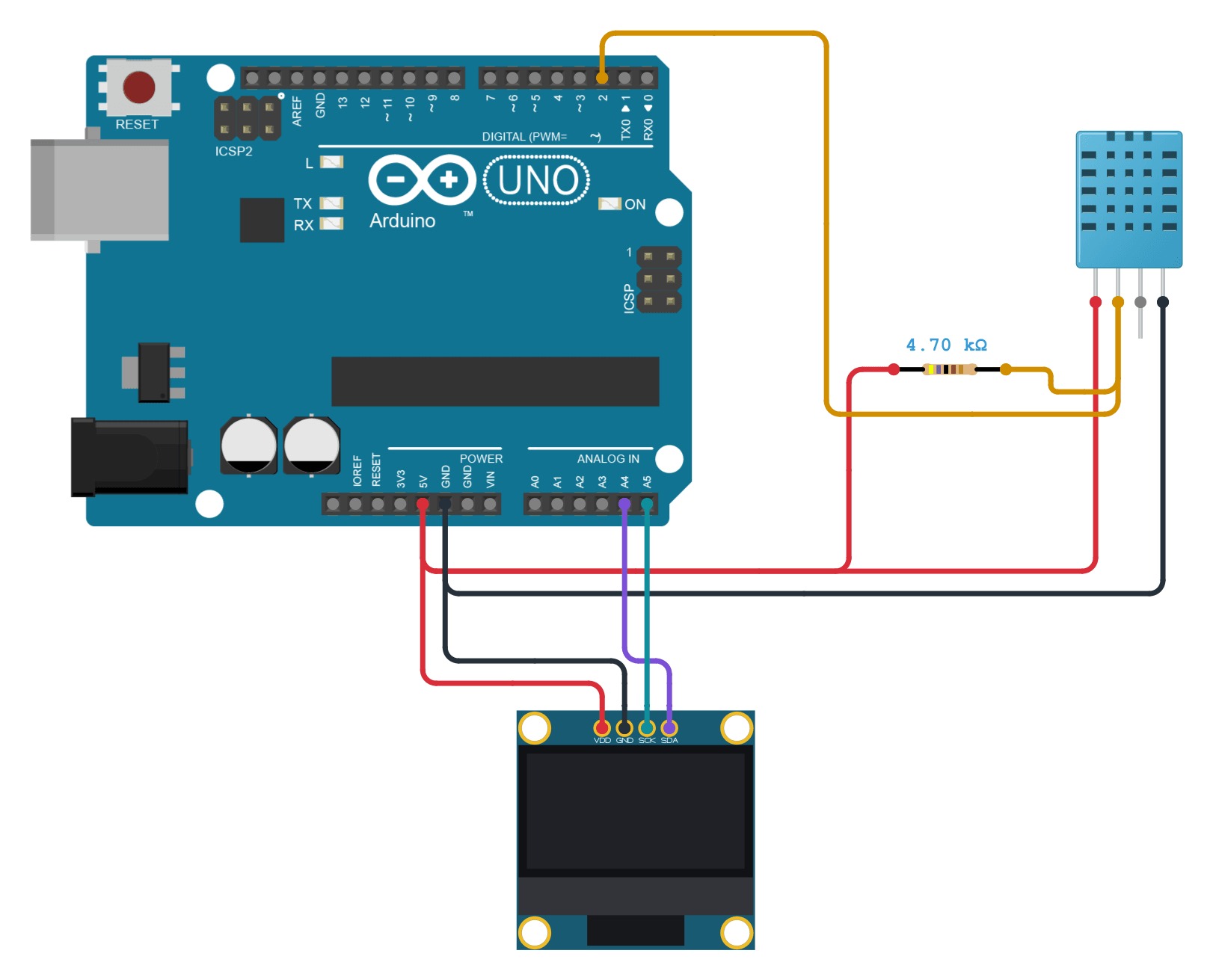
| DHT11 VDD | 5V | Show |
| DHT11 DATA | D2 | Show |
| Pull-up | 4.7 kΩ resistor from DATA to VDD | Show |
| DHT11 NC | Leave unconnected | Show |
| DHT11 GND | GND | Show |
| DHT22 VCC (+) | 5V | Show |
| DHT22 DAT (out) | D3 | Show |
| DHT22 GND (−) | GND | Show |
A DHT22 module has its pull-up built in; wire it by the labels printed on it. A bare four-pin DHT22 connects pin 1 to VDD, pin 2 to DATA and pin 4 to GND, with pin 3 left unconnected as in Aosong's wiring diagram. It needs its own 4.7 to 10 kΩ pull-up from DATA to VDD.
The side-by-side sketch
It reads both sensors every two seconds and prints both readings on one line. Install the DHT sensor library by Adafruit as in the DHT11 guide, or open the project in Cirkit Designer, which already includes it.
// A DHT11 and a DHT22 side by side: both read the same air
// every two seconds, and one line shows both readings.
// DHT11: VDD to 5V, DATA to D2, GND to GND, NC unused,
// and a 4.7 kOhm pull-up resistor from DATA to 5V.
// DHT22 module: VCC to 5V, DAT to D3, GND to GND
// (the module has its own pull-up).
#include <DHT.h>

DHT dht11(2, DHT11);
DHT dht22(3, DHT22);

void printReading(const char *name, DHT &sensor) {
  float humidity = sensor.readHumidity();
  float temperature = sensor.readTemperature();
  Serial.print(name);
  if (isnan(humidity) || isnan(temperature)) {
    Serial.print(F(" read failed"));
    return;
  }
  Serial.print(' ');
  Serial.print(temperature, 1);
  Serial.print(F(" C "));
  Serial.print(humidity, 1);
  Serial.print(F(" %"));
}

void setup() {
  Serial.begin(115200);
  dht11.begin();
  dht22.begin();
}

void loop() {
  delay(2000);  // each sensor answers at most every 2 s
  printReading("DHT11", dht11);
  Serial.print(F("  |  "));
  printReading("DHT22", dht22);
  Serial.println();
}DHT dht11(2, DHT11);The DHT11 on pin 2, with its type,
DHT11.DHT dht22(3, DHT22);The DHT22 on pin 3. The type tells the library which start signal to send; see switching.
void printReading(const char *name, DHT &sensor) {Reads one sensor and prints its temperature and humidity to one decimal place, or
read failed.delay(2000); // each sensor answers at most every 2 sWaits two seconds between rounds: neither sensor answers more often.
The Serial Monitor at 115200 baud shows a line like DHT11 25.0 C 60.0 % | DHT22 24.6 C 60.3 % every two seconds.
Switching from a DHT11 to a DHT22
The wiring is the same: VDD, DATA with a pull-up, and GND. In the code, change the type in one line:
DHT dht(DHT_PIN, DHT22); // was DHT11The type matters because the library sends a different start signal for each: it holds DATA low for 20 ms for a DHT11 and 1.1 ms for a DHT22. A DHT11 set as a DHT22 sees too short a signal and every read fails. Both are read at most every two seconds, so the timing in your sketch can stay.
FAQ
Are the DHT22 and the AM2302 the same sensor?
Yes. AM2302 is Aosong's name for it; DHT22 is the common name. The bare sensor has four pins; boards and wired versions sold as AM2302 often have three, with the pull-up built in.
Can I use both on one Arduino?
Yes, as in the circuit above: each needs its own data pin and its own DHT object, and they share power and ground.
Does the DHT22 work at 3.3 V?
Yes. Aosong's AM2302 datasheet gives 3.3 to 5.5 V. Pull DATA up to the same supply, 3.3 V on an ESP32; see the DHT11 guide's FAQ on long wires at 3.3 V.
Why does my DHT11 read whole numbers?
Older DHT11s send their tenths as zero, so the library reports 25.0 rather than 24.6. Aosong's current DHT11 sends tenths. The DHT22 always does.
Simulating them in Cirkit Designer
Both sensors answer the library through the Uno's real pins, with the reply timing in Aosong's datasheets, so the same code runs on hardware. Cirkit's DHT22 reads tenths from −40 to 80 °C and 0 to 100 %, gives no reading for about two seconds after power-up, and has its pull-up built in, as a module does. Its DHT11 reads whole numbers from 0 to 50 °C, like an older DHT11, and 20 to 80 % humidity, short of an older DHT11's 90 %. Neither adds the real sensors' measurement error or response lag.